The Bulk Import process saves you the hassle of creating every style and SKUs individually.
But before you begin bulk uploading your products, it is important to comprehend the general concepts and terminology underpinning the Bulk Import form. Understanding the levels of the variant hierarchy and the attribute types you’ll be asked to use in the Bulk Import form will make the product listing process even more streamlined and efficient for your business.
If you’re new to the Bulk Import process, check out our orientation article. This article will guide you through the general process of creating item listings and will connect you with more in-depth articles at different steps in the process.
For now, let’s start with the terminology of product listings. These general concepts will give you the foundation you need before step one: filling out the Bulk Import form.
What Is the Variant Hierarchy?
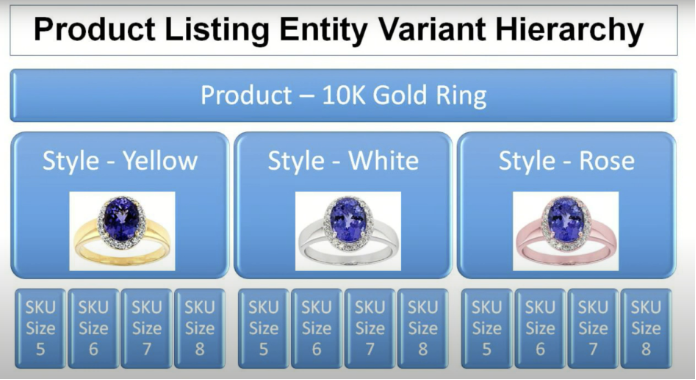
The variant hierarchy creates distinctions between products, styles and SKUs.
The first level of the variant hierarchy is the product. Products are generalized items on Jedora. For example, a 10k Gold Tanzanite Halo Ring is a product. While we know the purity of the gold, the gemstone, and the ring design, no specific information is given about the metal color at this stage.
The second level beneath product is the style. Styles of a 10k Gold Tanzanite Halo Ring could be a variety of metal colors. Although the rings are identical in purity, gemstone, and design, the metal type could be rose gold, yellow gold or white gold, thus creating different styles of rings.
The third and final level of the variant hierarchy is the SKU. SKUs (Stock Keeping Units) create further distinctions between styles. In the case of our 10k Rose Gold Tanzanite Halo Ring, each SKU would refer to a separate ring size.
What Are the Four Attribute Types in the Bulk Import Form?
You may be wondering how to format your answer for each field. The articles addressing the first and second steps of the Bulk Import process have detailed descriptions of each field and the required information. In italics, you will find the attribute type that applies to that entry and how to format your entry accordingly.
Below are the four attribute types you will be asked to use:
Text String.
A text string means that the information will be typed into the cell. In the case of your product’s title description or your Supplier Item Number, you will type in the full value.
Single Value List.
A single value list means that the information will be selected from a dropdown list in the cell. Examples of this include your shop title and the Harmonized Tariff Schedule Classification. However, if you begin typing into one of these fields, it will filter down the dropdown list, making the selection process easier.
Multi-Value List.
A multi-value list resembles a text string in that the information will be typed into a cell. However, because a multi-value list features multiple values, the separations must be indicated by using character separators. More information on character separators can be found below.
Measurement.
A measurement attribute is a multi-value list that specifies both the measurement value and the unit of measure. However, both values are separate and the distinction between them is indicated by using character separators much like a multi-value list, but slightly different.
How Do I Use Character Separators?
When the attribute type is a multi-value list, double exclamation points (!!) will be used as the character separators between values. For example, when you enter the ring sizes for your product, you will use double exclamation points to make sure that the values are separated out.
The final multi-value list attribute will look something like this: 5!!6!!7!!8
When the attribute type is measurement, double pipes (||) will be used as the character separators between values. For example, when you are entering a measurement value, you will use double pipes to separate the value from the unit of measure.
The final measurement attribute will look something like this: 3||mm
If you have any questions or would like to speak to a member of our team, please call 833-453-3672 or email PartnerSuccess@jedora.com.