Important Shipment Concepts
As we walk you through the Seller Fulfillment process, there are several terms you will see repeated throughout our help documentation. Knowing the difference between these similar terms early on should eliminate confusion as you assemble a shipment batch and prepare to fulfill it.
In this article, we will also address the documents that you will need to print for the fulfillment process and the various stages at which they will be needed. Again, the terms may seem similar to one another, but it’s important to know the difference between a picklist and a packlist or a shipment and a shipment group before you begin the process of fulfilling an order.
We’ll begin with the fundamental element of the shipment hierarchy: the shipment.
Shipment
A shipment contains one or more shipment lines and represents one or more customer orders from the same customer to the same destination address.
In most cases, the shipment will contain one customer order. However, if the customer placed two orders within a short window of time, the shipment may contain more than one order for the same customer.
Shipment Group
A shipment group is a grouping of “look-alike” shipments. Each shipment within that shipment group will have the exact same contents.
Imagine ten customers have all ordered the same ring. All of those shipments will fall under the same shipment group because they all will have the same contents, although being sent out to ten different customers. Grouping these together makes the fulfillment process more efficient.
Shipment Batch
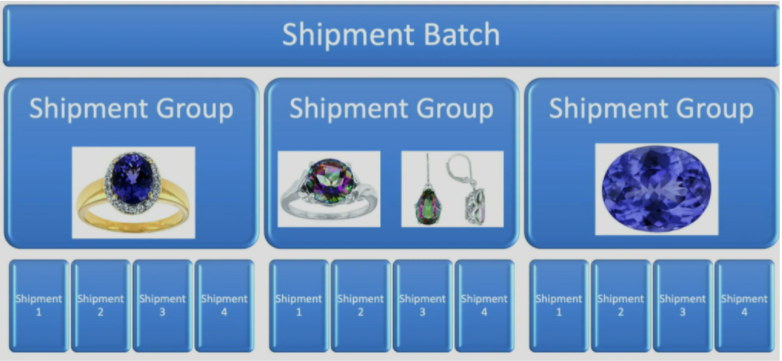
A shipment batch is a collection of several shipment groups to be fulfilled at the same time.
When you are fulfilling shipments, one of the first steps will be configuring a shipment batch. There are options for you to manually assemble a shipment batch or to select the maximum number of shipment groups, shipments, and SKUS permitted within a batch.
Either option has their pros and cons, but regardless of what you choose, a shipment batch is what you will be working with as you process shipments. Shipment groups, shipments and SKUS are all nested beneath that category.
Here’s a graphic that displays the correlation between these three terms and how multiple items can exist within a shipment group (in the case of the middle column).
The Shipment Documents You Will Need
Shipment Batch Picklist
The shipment batch picklist describes all the items you will need to select from your warehouse in order to fulfill that shipment batch. This list includes the supplier item numbers and the Jedora item numbers for each item, as well as the quantities you will need for the entire batch.
The shipping batch picklist should be printed at the beginning of the seller fulfillment process. For more information, read our help article on “How to Fulfill a Shipment Batch.”
Shipment Batch Packlist
The shipment batch packlist highlights the contents of each shipment group within the shipment batch. Think of this list as your “recipe book” for each of the shipments you are fulfilling. Making sure that your customers get what they ordered is top priority.
The shipment batch packlist should be printed at the beginning of the seller fulfillment process. For more information, read our help article on “How to Fulfill a Shipment Batch.”
Customer Packing Slip
The customer packing slip should be placed inside the package to indicate the contents of the package. The slip also includes the form they need for returns and exchanges, so including this paper with the shipment in the final steps of the fulfillment process is important.
Package Labels
The package labels should be attached to the outside of the package.
Please feel free to reach us at PartnerSuccess@jedora.com with any questions or concerns.
If you’re looking for more articles on Seller Fulfillment, check out the articles listed below:
- Making Changes to Your Shipping Settings
- Creating a Shipment Batch
- Fulfilling a Shipment Batch
- Processing a Returned Order
If you have any questions or would like to speak to a member of our team, please call 833-453-3672 or email PartnerSuccess@jedora.com.